Install the key2ski app
Download the free key2ski app and check that your smartphone is compatible before buying your ticket.
We’ve compiled some of the most frequently asked questions about tickets, orders, and more for you.
If you can’t find what you’re looking for, feel free to contact our customer support team for assistance.
Family bonus:
When purchasing a ski pass, the third and all younger siblings (child & youth as per age group regulations) get the ski pass for free.
Requirements: Ski pass purchase for at least one parent as well as the first two children or youths according to age group regulations for the same validity period required! Official proof of family status, joint main residence.
Free ticket cannot be purchased online! To pick up the free card at the ticket office, an invoice from the online store and proof of family status are required.
Multi-day passes are valid only on consecutive days. The use of multi-day ski passes is already possible the day before from 3 pm. (Taster bonus!)
Your ski ticket is stored on a contactless data carrier. Normally, this card is a KeyCard. The KeyCard is the card that allows you to conveniently recharge from home in our online store. For this reason, we recommend that you take your KeyCard home and store it in your user account so that you can conveniently recharge it from home for your next ski day. KeyCards are issued in Snow Space Salzburg for € 3,- deposit. Tickets from the ticket vending machine are an exception. These tickets are issued without deposit. A recharge is not possible.
The half-day limit for multi-day tickets is 12 o'clock. The half day can be used, for example, the first day in the afternoon or the last day in the morning.
In case of overlapping seasons, a mixed price is calculated. Also with the Junior Weekend Bonus - reduced price for children & teenagers on weekends - a mixed price is calculated for a multi-day ticket.
In our online ticket store you can order your ski passes comfortably from home. If you still have a KeyCard at home, you can simply add it to your user account and top it up. No need to go to the ticket office or ticket machine. Otherwise, use the pickup function: You will receive a QR code by e-mail, which you can use to conveniently pick up your ski passes on site at one of our ticket machines. Of course, it is also possible to pick up your ski passes at the ticket office using the QR code. (Season tickets can only be picked up at the ticket office).
If you order your ski pass directly from home in our online ticket store, you will receive a QR code by e-mail after you have placed your ticket order. You can either save the QR code on your cell phone or print it out at home. To get your ski pass on site at the ski resort, you either have to scan the QR code from your cell phone screen at the ticket machine or scan the printout you brought with you. After you have scanned the QR code in one of the two explained ways at the ticket vending machine, you can take your ready-printed ski pass from the dispensing slot of the machine.
Locations of the ticket machines:
Can tickets be canceled?
A subsequent booking of the cancellation guarantee after completion of the order is not possible. Cancellation can be requested by message via contact form, indicating the order number and order name.
When purchasing multi-day tickets and selected day tickets in the ticket store, there is a possibility to book a cancellation guarantee to your ticket. Cancellation of ski passes is only possible with the booked cancellation guarantee, which must be announced 2 days before the start of validity (e.g. ticket valid from Saturday, cancellation guarantee can be requested until Wednesday 23:59) without giving reasons. The cancellation guarantee costs € 2,50 per day and per ski pass.
What is the Online Early Booking System // How does it work?
With the early booking system you have the chance to get your ticket in advance at a lower price. Simply select the desired period and the type of ticket and see the best price directly.
Are discounted tickets only available online or also at the box office?
Discounted tickets under the online early bird system can, as the name suggests, only be purchased online. Discounts such as the Junior Weekend Bonus, the Family Bonus from the 3rd child or group prices are still also available at the box offices.
Do I have to book in advance to benefit?
Discounted tickets are only available in the online ticket store. To benefit from the early booking bonus, we recommend booking your desired ticket as soon as possible to get the highest possible bonus. The closer the desired ski day, the less discount possible.
Will it only be possible to book tickets online in the future?
No. It is important for us to be able to advise our guests on the spot about the various requests and this will also be possible in the future. In order to offer you the best possible advice on the one hand and on the other hand to make sure that you get on the slopes quickly, all those guests who do not need personal advice will be able to book tickets online.
Does everyone get a discounted ticket?
The contingent for the early booking bonus is limited. In order to get the best price or a discounted ticket, we recommend booking early. The point in time when the contingent is used up varies greatly due to different factors, such as demand, the type of ticket (whether it is a day ticket or a multi-day ticket) or the desired time period (vacation period, weekday, etc.).
For which types of tickets is the online early booking bonus available?
The online early booking bonus is available for all multi-day tickets from 2 to 18 days and selected day tickets. There is no online early bird bonus for Ski amadé ALL-IN Card White/Gold/Green and SuperSkiCard tickets.
How far in advance do I have to buy my ticket to get a discount?
The time at which the allotments are used up varies due to different factors such as demand, the type of ticket or the desired period. It is not possible to specify how much earlier you need to book a ticket in order to get a discounted ticket. In order to get the best price or a discounted ticket, we recommend booking early.
Is it possible that the ticket will be even cheaper?
No. The price shown at the time of purchase is always the cheapest and therefore the best price. After that, the price will only increase until it reaches the maximum = box office price.
What is the best price?
The best price is the price displayed in the online ticket store. You can be sure that this will always be the lowest possible price for the selected period and ski pass.
If you have made a mistake in your booking, a new purchase is required.
Cancellation of the incorrect booking will be made at a later date.
How. Please fill in your cancellation request in the contact form with your order number.
We will get back to you. A new purchase with the correct date is required. Re-bookings are not possible.
To the contact form: www.snow-space.com/kontakt
STORNOGARANTIE - your all-round carefree upgrade!
Book your multiday ski pass with the cancellation guarantee for only € 3,00 per ski ticket and day and secure the possibility to cancel your ski pass up to 2 days before validity.
Just add it at the end of the booking.
In case of cancellation, simply send a request via contact form until 2 days before the start of the validity, indicating the order number and order name.
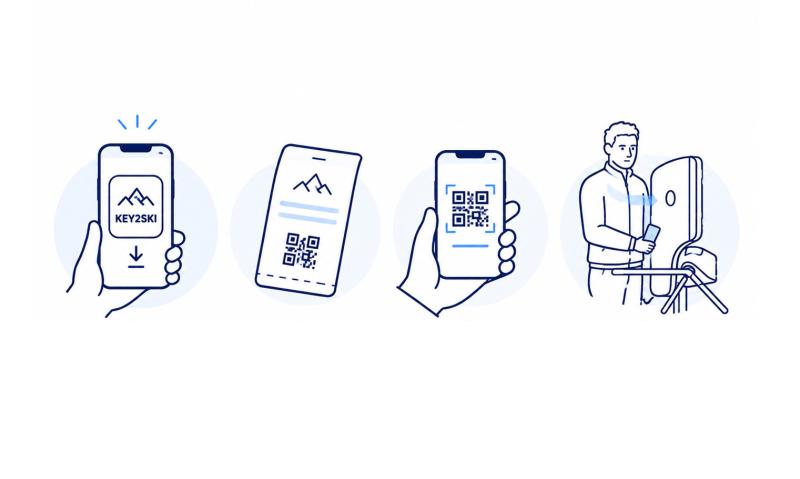
Download the free key2ski app and check that your smartphone is compatible before buying your ticket.
Buy your ski pass in the Online Ticketshop and select Smartphone Ticket as your ticket delivery method.
Open the download link or scan the QR code to load your ticket into the key2ski app. Activate Bluetooth and location services.
Carry your smartphone on your left side at chest level and keep the app running in the background. Access works via Bluetooth.
You need a compatible smartphone, the free key2ski app and a valid Smartphone Ticket.
iPhone 6 and older devices are not supported. This also currently applies to devices from Huawei, OnePlus, Oppo and Honor.
Some Xiaomi, Redmi, Poco and Samsung S8/S9 models may also have compatibility limitations.
The key2ski app is available free of charge from the Apple App Store and Google Play.
If your smartphone does not meet the system requirements, the key2ski app may not be displayed in the app store.
Installing the app first allows you to check whether it is available and compatible with your smartphone.
Complete the initial setup and grant the required permissions before purchasing your Smartphone Ticket.
Bluetooth and location services must be enabled for access at the turnstile. Your ticket must also be activated manually in the app.
On Android devices, battery optimisation should be disabled for key2ski so that the app can continue running in the background.
Check that your smartphone has enough free storage space and then try again.
Smartphone Tickets are available exclusively online through the Ticketshop.
Selected one-day ski passes, multi-day ski passes and Ski amadé ALL-IN Card White/Gold are available as Smartphone Tickets.
During the purchase process, you can see whether the Smartphone Ticket option is available when selecting your ticket delivery method.
After purchase, you will receive a confirmation email containing the information for your Smartphone Ticket.
Open the download link on the smartphone you want to use at the lift or scan the QR code with the key2ski app.
A Smartphone Ticket can only be loaded into the app once and is non-transferable.
Each person therefore needs their own smartphone.
No. Once the Smartphone Ticket has been loaded onto a device, it cannot be transferred to another smartphone.
Yes. You can buy several ski passes in one transaction. Each person receives their own QR code or download link.
Each ticket must be loaded into the key2ski app on the respective person's smartphone.
Yes. You can store several of your own Smartphone Tickets with different validity periods in the key2ski app.
Enable Bluetooth and location services and grant the required permissions. Then select “Activate” or “Use Ticket” in the key2ski app.
Yes. Once your Smartphone Ticket is activated in the app, you can go directly to the lift.
Carry your smartphone on your left side at chest level, for example in your left jacket pocket.
Do not keep it in your trouser pocket. Wallets, metal objects or other cards should not cover the smartphone.
Yes. The app must remain active in the background. If you close it completely, the Smartphone Ticket will be deactivated.
Simply reopen the app and activate your ticket again.
No. Internet access is only required for the initial download of your Smartphone Ticket.
Afterwards, the ticket works offline. Communication with the access system takes place via Bluetooth.
No. According to the current key2ski information, the app does not collect personal or location-based usage data.
No. You choose one ticket delivery method when purchasing your ski pass. Do not carry an additional KeyCard close to your smartphone.
Multiple media may be detected at the same time and can cause problems at the turnstile.
Possible reasons include:
Check your internet connection and make sure you are using the correct QR code or download link.
Check that you purchased a Smartphone Ticket and then load it into the key2ski app using the QR code or download link from your purchase confirmation.
No. A Smartphone Ticket that has already been loaded cannot currently be transferred to another device.
Activation tells the app which Smartphone Ticket you want to use. Tap “Activate” or “Use Ticket” before entering the lift.
App updates can improve compatibility, stability and ease of use.
Detection speed can vary depending on the smartphone. This is due to technical differences between devices.
Please contact our team on site. With your purchase confirmation, your Smartphone Ticket can be issued on a replacement KeyCard at a ticket counter.
We recommend keeping other cards away from your smartphone while using the Smartphone Ticket, as they may interfere with detection at the turnstile.
Take your booking confirmation to a ticket counter. Your Smartphone Ticket can be issued on a replacement KeyCard.
Visit a ticket counter with your booking confirmation. Your Smartphone Ticket can be issued on a new KeyCard.
On newer smartphones, additional battery consumption is approximately 10–20% per skiing day. Actual usage depends on the device.
No. Mobile data is not required after the initial ticket download. Communication with the access system takes place via Bluetooth.
Yes. You’ll find the permission number you can use in your booking confirmation. Unfortunately, photo points and speed tracks don’t work with a smartphone ticket.Your booking confirmation contains the authorisation number that you can enter in your Skiline profile.